How to Create Modern AI Chatbot Experiences in Angular
- Date
- Updated
Demo
The user sends a message. A pulsing dot shows while the AI thinks, and then the response streams in as Markdown.
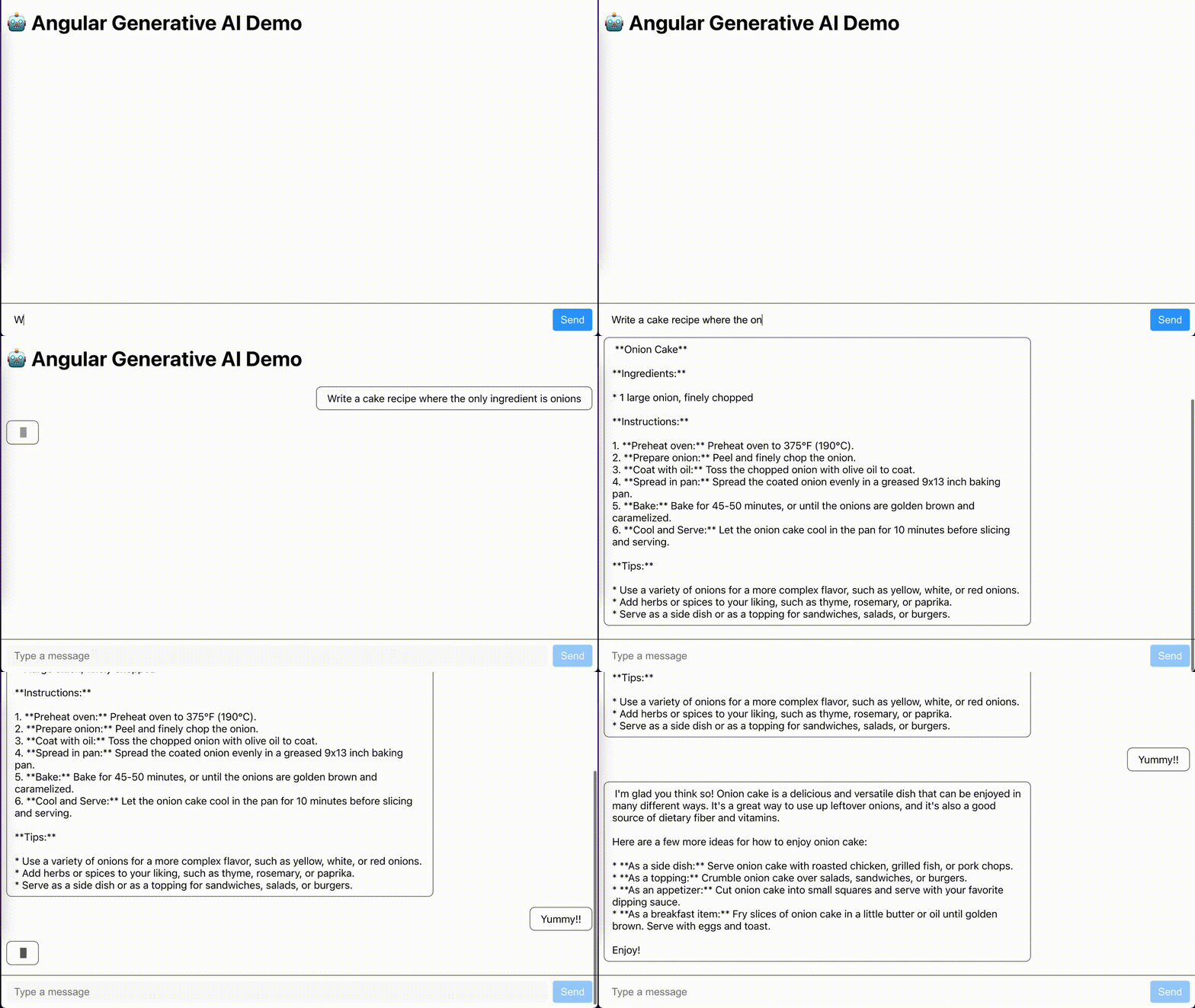
Prefer video? I gave this as a talk at ng-conf:
Setup
Clone the demo repo and install its dependencies:
git clone https://github.com/c-o-l-i-n/ng-generative-ai-demo.git
cd ng-generative-ai-demo
npm install
Get an API key from Google AI Studio and put it in a .env file at the project root:
# .env
GOOGLE_AI_STUDIO_API_KEY=paste-api-key-here
Backend
We’ll use Google’s Gemini API because it has a free tier, as long as you’re willing to sell your soul and your data to Google. The whole backend is one Hono app:
// src/server.ts

import { GoogleGenAI } from '@google/genai';
import { serve } from '@hono/node-server';
import dotenv from 'dotenv';
import { Hono } from 'hono';
import { cors } from 'hono/cors';
import { stream } from 'hono/streaming';

dotenv.config();

const { GOOGLE_AI_STUDIO_API_KEY } = process.env;

if (!GOOGLE_AI_STUDIO_API_KEY) {
  throw new Error('Provide GOOGLE_AI_STUDIO_API_KEY in a .env file');
}

const ai = new GoogleGenAI({ apiKey: GOOGLE_AI_STUDIO_API_KEY });
const chat = ai.chats.create({ model: 'gemini-3.1-flash-lite' });

const app = new Hono();

app.use(cors());

app.post('/message', async (c) => {
  const prompt = await c.req.text();

  console.log('Received prompt:', prompt);

  if (!prompt) {
    return c.body(null, 400);
  }

  return stream(c, async (s) => {
    try {
      console.log('Generating response:');
      const response = await chat.sendMessageStream({
        message: prompt,
      });

      for await (const chunk of response) {
        const chunkText = chunk.text;
        console.log(chunkText);
        await s.write(chunkText ?? '');
      }
    } catch (err) {
      console.error('Error generating response:', err);
    }
  });
});

const port = 3000;
serve({ fetch: app.fetch, port }, () => {
  console.log('Server is running on port', port);
});
The /message endpoint sends the prompt to Gemini and writes each chunk to the response as it arrives. Hono’s stream() helper closes the response when the callback finishes. cors() lets the Angular dev server on port 4200 call the backend on port 3000.
ai.chats.create() opens one chat session that remembers the conversation in memory, which is fine for a demo.
App config
The app’s only provider is ngx-markdown, which renders the AI’s Markdown:
// src/app/app.config.ts

import { ApplicationConfig } from '@angular/core';
import { provideMarkdown } from 'ngx-markdown';

export const appConfig: ApplicationConfig = {
  providers: [
    // add markdown support to handle llm output
    provideMarkdown(),
  ],
};
State
MessageService holds the chat state and streams the responses.
// src/app/message.service.ts

export interface Message {
  id: string;
  text: string;
  fromUser: boolean;
  generating?: boolean;
}

@Service()
export class MessageService {
  private readonly http = inject(HttpClient);

  private readonly completeMessages = signal<Message[]>([]);
  private readonly incomingMessage = signal<Message | null>(null);

  readonly messages = computed(() => {
    const incomingMessage = this.incomingMessage();
    return incomingMessage
      ? [...this.completeMessages(), incomingMessage]
      : this.completeMessages();
  });

  readonly generatingInProgress = computed(
    () => this.incomingMessage() !== null,
  );
Two private signals hold the state, completeMessages and incomingMessage. messages and generatingInProgress are computed from them, so they can’t drift out of sync.
Streaming the response
// src/app/message.service.ts

private getChatResponseStream(prompt: string): Observable<Message> {
  const id = window.crypto.randomUUID();

  return this.http
    .post('http://localhost:3000/message', prompt, {
      responseType: 'text',
      observe: 'events',
      reportProgress: true,
    })
    .pipe(
      filter(
        (event: HttpEvent<string>): boolean =>
          event.type === HttpEventType.DownloadProgress ||
          event.type === HttpEventType.Response,
      ),
      map((event: HttpEvent<string>): Message =>
        event.type === HttpEventType.DownloadProgress
          ? {
              id,
              text: (event as HttpDownloadProgressEvent).partialText!,
              fromUser: false,
              generating: true,
            }
          : {
              id,
              text: (event as HttpResponse<string>).body!,
              fromUser: false,
              generating: false,
            },
      ),
      startWith<Message>({
        id,
        text: '',
        fromUser: false,
        generating: true,
      }),
    );
}
responseType: 'text',observe: 'events', andreportProgress: truemakeHttpClientemit aDownloadProgressevent for each chunk.filterkeeps the progress events and the finalResponse.mapturns each event into aMessage.partialTextholds all the text received so far, so each message replaces the last one.startWithemits an empty message right away, which shows the pulsing dot.
Sending a message
// src/app/message.service.ts

sendMessage(prompt: string): void {
  this.completeMessages.update((msgs) => [
    ...msgs,
    { id: window.crypto.randomUUID(), text: prompt, fromUser: true },
  ]);

  this.getChatResponseStream(prompt).subscribe({
    next: (message) => this.incomingMessage.set(message),

    complete: () => {
      const completedMessage = this.incomingMessage();
      if (completedMessage) {
        this.completeMessages.update((messages) => [
          ...messages,
          { ...completedMessage, generating: false },
        ]);
      }
      this.incomingMessage.set(null);
    },

    error: () => this.incomingMessage.set(null),
  });
}
sendMessage adds the user’s message, then sets incomingMessage on every stream update. When the stream completes, the AI message moves into completeMessages. On error, incomingMessage resets so the send button doesn’t stay disabled.
UI
<!-- src/app/app.component.ts -->

<!-- Message List -->
@for (message of messages(); track message.id) {
  @if (message.fromUser) {
    <div class="flex flex-row-reverse">
      <pre
        class="max-w-[80%] rounded-2xl rounded-br-sm bg-blue-600 px-4 py-2 font-sans leading-relaxed whitespace-pre-wrap text-white"
        >{{ message.text }}</pre>
    </div>
  } @else {
    @if (message.generating && !message.text) {
      <div class="px-1 py-2">
        <div class="size-4 animate-pulse rounded-full bg-white"></div>
      </div>
    } @else {
      <markdown
        [data]="message.text"
        class="prose prose-invert w-full max-w-none px-1 py-2 leading-relaxed text-slate-200"
      />
    }
  }
}
User messages get a blue bubble. An AI message with no text yet shows a pulsing dot. Once text arrives, ngx-markdown renders it and Tailwind’s prose classes style it. The rest of the component reads the two computed signals and passes form submissions to MessageService.
Run it
Start the backend and the Angular dev server in two terminals:
# terminal 1
npm run server

# terminal 2
npm start
Then open http://localhost:4200.
Takeaways
- Stream the LLM response from the backend with Hono’s
stream()helper - Read it in Angular with
HttpClientprogress events - Keep state in signals and derive the rest with
computed
Happy coding!